
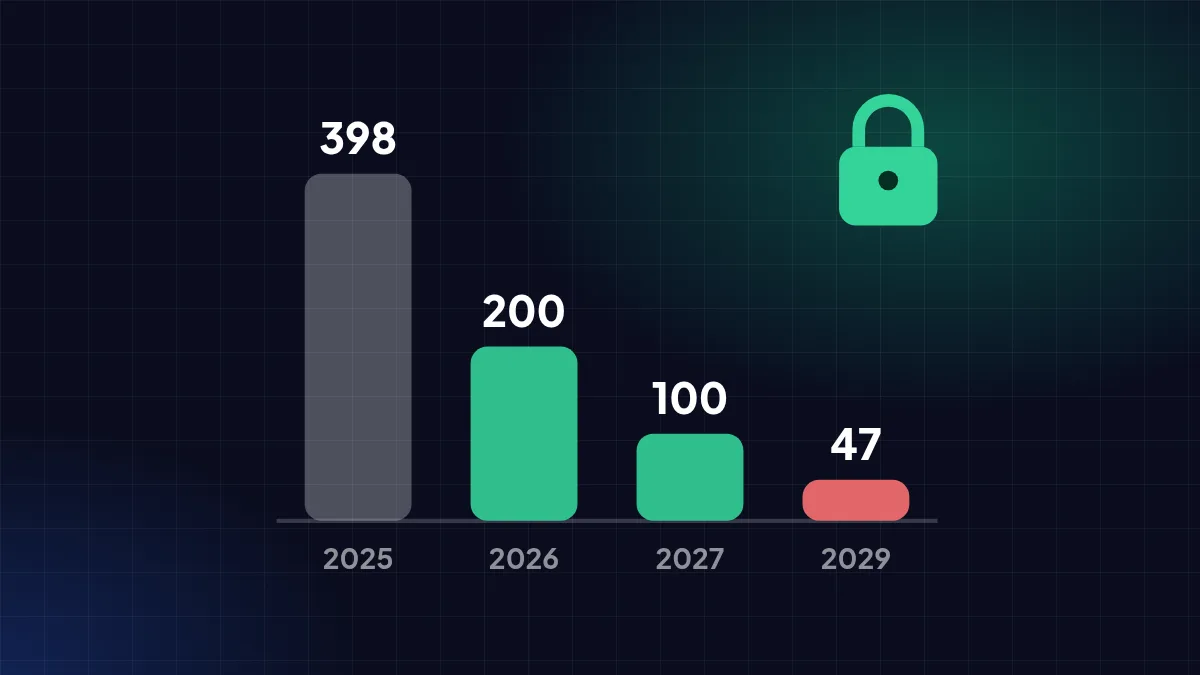
CA/Browser Forum rules cut certificate lifetimes step by step to 47 days by 2029. Renewing by hand once a year is no longer enough.
Since 15 March 2026, public SSL certificates can be valid for at most 200 days — down from 398. It is the first step of a CA/Browser Forum rule that shortens certificate lifetimes step by step to just 47 days in 2029.
Who sets these rules
The CA/Browser Forum brings together certificate authorities (CAs) and browser makers to write the *Baseline Requirements* every CA must follow. Ballot SC-081v3 passed on 11 April 2025 without a single vote against: 25 CAs voted yes, and all four browsers (Google, Apple, Microsoft, Mozilla) voted yes.
The reasoning: short-lived certificates reduce the risk when keys leak or ownership data changes, and push the ecosystem towards more reliable automated renewal.
The full schedule
| From | Max. validity | Domain validation reuse |
|---|---|---|
| Before 15 Mar 2026 | 398 days | 398 days |
| 15 Mar 2026 | 200 days | 200 days |
| 15 Mar 2027 | 100 days | 100 days |
| 15 Mar 2029 | 47 days | 10 days |
This schedule is in the current Baseline Requirements and CAs already comply — DigiCert, for example, shortened its domain validation reuse in February 2026. Company identity data for OV/EV certificates can now only be reused for 398 days (previously 825).
Email validation is being phased out
Domain validation by email to addresses such as [email protected] has been discouraged since March 2026, phone validation is banned from March 2027, and email to constructed addresses is banned entirely from 15 March 2028. Validation through a DNS record or HTTP file becomes the main option — and both can be automated.
Let's Encrypt is shortening too
| Date | Let's Encrypt change |
|---|---|
| 26 Jun 2025 | Expiry reminder emails ended. |
| 13 May 2026 | Optional 45-day certificate profile available. |
| 10 Feb 2027 | Default lifetime becomes 64 days. |
| 16 Feb 2028 | Default lifetime becomes 45 days. |
Let's Encrypt recommends ACME clients that support *ACME Renewal Information* (ARI), or renewing once two-thirds of the lifetime has passed (64-day announcement, 45-day plan).
How to prepare
- Make renewal automatic — through ACME/Certbot, your hosting panel, or CDN. Don't rely on reminder emails.
- Switch to DNS or HTTP validation if you have been using email validation.
- List every place a certificate is installed: website, subdomains, mail server, admin panels, network devices.
- For paid certificates, ask whether your provider supports automatic reissuance during the subscription.
FAQ
If I buy a 1-year SSL, do I lose out? Subscriptions can still run a year or more; what changes is that the certificate inside must be reissued more often during the subscription.
Do installed certificates stop working immediately? No. The rules apply to certificates issued after each date.
Sources
- Ballot SC081v3: Introduce Schedule of Reducing Validity and Data Reuse Periods — CA/Browser Forum — cabforum.org
- TLS Baseline Requirements — CA/Browser Forum — github.com
- Domain validation reuse changes in 2026 — DigiCert — knowledge.digicert.com
- Moving to 64-day certificates — Let's Encrypt — letsencrypt.org
- From 90 to 45 days — Let's Encrypt — letsencrypt.org
- Expiration Notification Service Has Ended — Let's Encrypt — letsencrypt.org
Written from the sources above as of 31 October 2026. Third-party policies and figures can change — check the original sources for the latest.
All news